Integrating the Love Lettering Stamp Brush into Professional Design Workflows
In the fast-paced world of digital design, efficiency often dictates the quality of the final output. Whether you are a freelance illustrator, a small business owner managing your own branding, or a content creator producing daily assets for social media, the tools you choose must serve a dual purpose: they must elevate the aesthetic quality of your work while simultaneously streamlining your production process. The Love Lettering Stamp Brush represents a specific category of digital asset designed to bridge the gap between hand-crafted authenticity and scalable workflow efficiency. By understanding how to integrate this tool effectively, designers can reduce repetitive tasks and focus more on high-level creative decisions.
At its core, the Love Lettering Stamp Brush is not merely a collection of images; it is a functional component of a broader design ecosystem. This pack features a variety of shapes specifically curated to facilitate pattern design with a cactus theme or to create ornamental accents that enhance typography and layout compositions. For professionals, the value lies in the versatility of these assets. A cactus-themed pattern might be the central focus of a textile design project, while the ornamental elements could serve as subtle dividers in a wedding invitation suite or as decorative bullets in a marketing presentation. The ability to switch between these applications without leaving your primary software environment is where the true productivity gain occurs.
Pre-Production Planning and Asset Compatibility
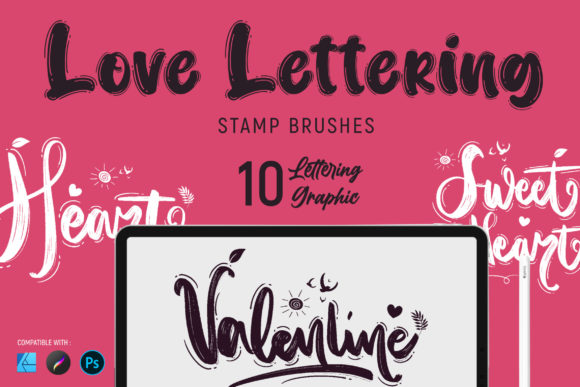
Successful implementation of any digital brush set begins long before the first stroke is made. It starts with verifying compatibility and ensuring your technical infrastructure supports the asset's requirements. The Love Lettering Stamp Brush is distributed in multiple formats to accommodate different professional environments, specifically .brushset for Procreate, .abr (implied by Photoshop CC compatibility), and .afbrushes for Affinity Designer.
For iPad users relying on Procreate, it is critical to note that installing the .brushset file requires iOS 11 and Procreate version 4.1 or higher. This specification is vital for freelancers who may be working on older devices or those who have not updated their software recently. Attempting to import these assets without meeting the version requirements can lead to workflow interruptions and data corruption. Similarly, desktop-based professionals using Photoshop CC or Affinity Designer must ensure their software licenses are active and updated to recognize the specific stamp properties embedded in these files.
Before commencing a project, take the time to organize these assets within your software library. Rather than dumping the entire pack into your default brush folder, create a dedicated group labeled "Love Lettering Stamps" or "Cactus Ornaments." This organizational step ensures that when you are in the middle of a tight deadline, you are not scrolling through hundreds of unrelated brushes to find the specific leaf or flower shape you need. Consistency in asset management is a hallmark of professional execution.
Execution: From Concept to Pattern Design
Once the technical setup is complete, the Love Lettering Stamp Brush becomes a dynamic tool during the creation phase. Its utility is most evident in pattern design, a task that traditionally requires significant time to sketch, vectorize, and repeat manually. With this stamp set, the process shifts from drawing every element from scratch to composing and arranging pre-made, high-quality shapes.
Consider a scenario where a marketer needs to create a series of Instagram stories for a botanical garden event. Using the cactus-themed shapes, they can rapidly construct a seamless background pattern. The workflow involves placing a base shape, rotating it, and using the stamp's natural variation to avoid the robotic look often associated with digital repetition. Because the brushes are designed to be "very easy to use," the learning curve is minimal, allowing the designer to experiment with density and spacing immediately. This speed allows for rapid iteration; you can test five different pattern variations in the time it would usually take to sketch one.
Beyond patterns, these stamps excel in ornamentation. When designing a logo or a custom lettering piece, the addition of small floral or geometric accents can transform a standard font into a bespoke typographic treatment. The Love Lettering Stamp Brush allows you to layer these elements non-destructively. In Photoshop or Affinity Designer, place each stamp on a separate layer. This practice provides granular control over opacity, blending modes, and color adjustments. If a client requests a change in the accent color from sage green to terracotta, you can adjust the layer style instantly without redrawing the element. This flexibility is crucial for maintaining agility in client-facing projects.
Optimizing Quality and Consistency
While ease of use is a selling point, maintaining high quality control is essential for professional output. The "good looking" nature of the design mentioned in the product description relies heavily on how the user manipulates the tool. To ensure consistency across a large project, such as a brand identity package or a published book, establish a style guide for how these stamps are used. Define rules regarding maximum size, minimum spacing, and acceptable color palettes.
For example, if you are creating a series of educational worksheets for educators, decide beforehand that the cactus stamps will only appear in the corners of the pages and will never exceed 10% of the page width. This prevents the design from becoming cluttered and ensures that the text remains the primary focus. By treating the Love Lettering Stamp Brush as a systematic element rather than a random decoration, you maintain a cohesive visual language throughout your deliverables.
Furthermore, consider the resolution and scalability of your output. While Procreate is excellent for illustration, ensure that your canvas size is set sufficiently high if the final output is intended for print. Stamp brushes can sometimes lose definition if scaled up excessively beyond their original raster resolution. For large-format printing, it may be prudent to test a stamp at 100% scale before committing to a full design layout. If working in Photoshop or Affinity, leverage smart objects or vector masks where possible to preserve edge sharpness during resizing.
Post-Production and Long-Term Utility
The value of the Love Lettering Stamp Brush extends beyond the completion of a single project. These assets are designed for long-term use, serving as a reusable resource in your creative arsenal. After finishing a project, archive the layered files with the stamps intact. This allows you to revisit the design months or years later to make updates or repurpose elements for new campaigns. For entrepreneurs and small business owners, this reusability translates to cost savings, as there is no need to commission new illustrations for every seasonal update.
Additionally, these tools foster skill development. By analyzing how the shapes interact to form patterns, hobbyists and students can learn fundamental principles of composition, balance, and rhythm. The immediate feedback loop provided by digital stamping allows for experimentation that reinforces design theory. Over time, users develop an intuition for spacing and arrangement that improves their overall design capabilities, even when working without stamps.
Should you encounter technical difficulties or have specific questions regarding the integration of these brushes into a complex workflow, reaching out to the creator is a recommended step. The availability of support indicates a commitment to the user's success, ensuring that any hurdles related to installation or usage can be resolved quickly. This level of support is particularly valuable for professionals who cannot afford extended downtime due to technical glitches.
In conclusion, the Love Lettering Stamp Brush is more than a decorative add-on; it is a strategic tool for enhancing workflow efficiency and creative output. By carefully planning your asset management, leveraging the tool during the composition phase, and maintaining strict quality controls, you can seamlessly integrate these cactus-themed shapes and ornaments into a wide array of professional projects. Whether you are designing for print, web, or social media, the ability to produce high-quality, consistent visuals rapidly is a competitive advantage. Embrace the practicality of these digital assets to streamline your process and elevate the visual impact of your work.