Master Realistic Watercolor for Procreate
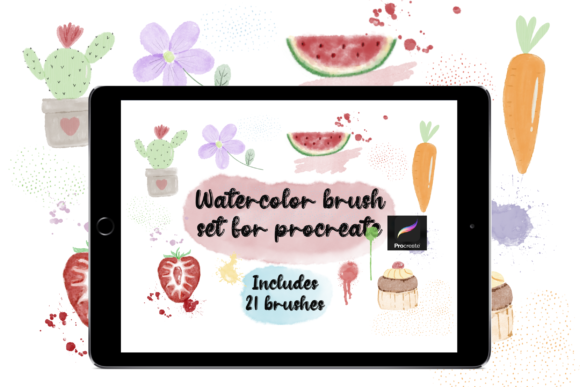
Digital art has long struggled to replicate the organic, unpredictable beauty of traditional media. For years, artists missed the way pigment pools on paper, how colors bleed into one another, and the subtle texture of a wet brushstroke. Watercolor for Procreate changes that narrative entirely. With a specialized set of seven high-fidelity brushes, you can now create amazing realistic illustrations directly on your iPad. This isn't just about applying color; it is about simulating the physics of water and pigment to produce work that feels alive.
To get started, you will need an iPad running Procreate version 5 or higher. Once installed, these seven watercolor brushes arrive in a convenient .brushset format, allowing for instant integration into your library. But beyond the technical setup, the real value lies in how this tool adapts to your specific creative goals. Whether you are a seasoned illustrator, a small business owner building a brand, or a hobbyist looking to unwind, the approach to using these digital watercolors will vary significantly.
Why Realism Matters in a Digital Workflow
The primary appeal of this brush set is its ability to mimic reality without the mess. Traditional watercolor requires expensive paper, precise water control, and a forgiving mindset regarding mistakes. Digital watercolor offers the aesthetic with the safety net of "undo." However, not all digital brushes achieve this balance. Many look too clean, too uniform, or overly synthetic.
These seven brushes are engineered to reintroduce chaos and character into your digital canvas. They respond to tilt, pressure, and speed, allowing pigment to pool naturally at the edges of your strokes. For professionals, this means delivering client work that carries the warmth of hand-painted art while maintaining the efficiency of a digital file. For beginners, it removes the intimidation factor of wasting materials, encouraging experimentation that leads to faster skill acquisition.
Perspectives from Different Creators
The utility of Watercolor for Procreate shifts depending on who is holding the Apple Pencil. Understanding these differences helps you evaluate whether this tool aligns with your current projects.
The Professional Illustrator and Freelancer
For working artists, time is money, but quality is reputation. A freelancer might prioritize the commercial value and flexibility of these brushes. Unlike traditional media, where scanning and editing can take hours, digital watercolor allows for immediate adjustments to hue, saturation, and composition.
Imagine a children's book illustrator who needs to maintain a soft, whimsical style across twenty pages. Using these brushes, they can ensure consistent texture and lighting without worrying about running out of a specific paint tube or dealing with inconsistent paper grain. The ability to layer transparent washes realistically means they can build depth quickly, meeting tight deadlines without sacrificing the hand-crafted look clients demand.
The Small Business Owner and Marketer
Entrepreneurs and marketers often lack formal art training but need unique visuals to stand out in a saturated market. Stock photography feels generic, and hiring an agency can be prohibitively expensive. Here, the priority is ease of use and brand distinctiveness.
A boutique coffee shop owner could use these watercolor tools to design seasonal menu boards or social media graphics that feel artisanal and welcoming. The learning curve is gentle enough that a non-artist can create flattering floral accents or textured backgrounds in an afternoon. The result is branding that feels human and approachable, fostering a deeper emotional connection with customers than sterile vector graphics ever could.
Educators and Content Creators
Teachers and bloggers focus on engagement and clarity. In educational materials, heavy blocks of text can be daunting. Soft watercolor illustrations can break up content, highlight key concepts, and make learning materials more inviting.
An educator creating digital worksheets might use the transparency of these brushes to overlay diagrams on maps or biological charts, adding a layer of visual interest that keeps students focused. Similarly, lifestyle bloggers can craft custom headers and pins that reflect a personal aesthetic, avoiding the cookie-cutter templates that plague many niches.
The Hobbyist and Lifelong Learner
For the hobbyist, the goal is often creativity and relaxation. There is no client to please, only the joy of creation. These brushes offer a low-stakes environment to explore color theory and composition. You can paint a sunset, wipe the canvas, and try again instantly. This freedom encourages risk-taking, which is essential for artistic growth. The tactile feedback provided by the brushes makes the experience meditative, turning screen time into a restorative practice rather than a passive consumption of content.
Key Features That Drive Versatility
What makes this specific collection of seven brushes so effective? It comes down to the nuance of their programming. Each brush serves a distinct purpose in the painting process, mirroring a traditional traveler's watercolor kit:
- Base Washes: Designed for laying down broad, even fields of color that still retain subtle paper texture.
- Wet-on-Wet Blenders: These allow colors to bleed into each other naturally, creating soft gradients essential for skies and skin tones.
- Detail Liners: Capable of mimicking the sharp edge of a dry brush for fine lines and intricate patterns.
- Texture Stampers: Add granulation and speckling to simulate mineral pigments like ultramarine or burnt sienna.
This variety ensures that you aren't limited to one style. You can pivot from loose, abstract expressionism to tight, botanical realism within the same session. The reliability of the brushes means they behave predictably once you understand their mechanics, yet they retain enough randomness to keep every stroke feeling unique.
Making the Right Choice for Your Needs
Before diving in, consider what you value most in your creative workflow. If your priority is speed, these brushes streamline the process by eliminating the setup and cleanup of physical paints. If you value learning value, the immediate feedback loop helps you understand how light and shadow interact much faster than traditional methods.
However, it is important to recognize that digital watercolor is a tool, not a magic wand. While it simulates realism beautifully, mastering it still requires an understanding of fundamental art principles. Beginners should not expect perfection on day one; instead, they should view the .brushset as a sandbox for play. Professionals should view it as an expansion of their existing toolkit, one that solves specific logistical problems associated with traditional media.
Ultimately, the decision to adopt Watercolor for Procreate depends on your desire to blend the best of both worlds. It offers the soul of traditional painting with the superpowers of digital technology. Whether you are designing a logo, illustrating a novel, or simply coloring to de-stress after a long day, these seven brushes provide the fidelity and flexibility needed to bring your vision to life.
Just start creating. Load the .brushset into your Procreate app, select your favorite brush, and let the digital water flow. The barrier between your imagination and the final image has never been thinner.