Mastering Modern Calligraphy with the Procreate Lettering Brush - Camlur
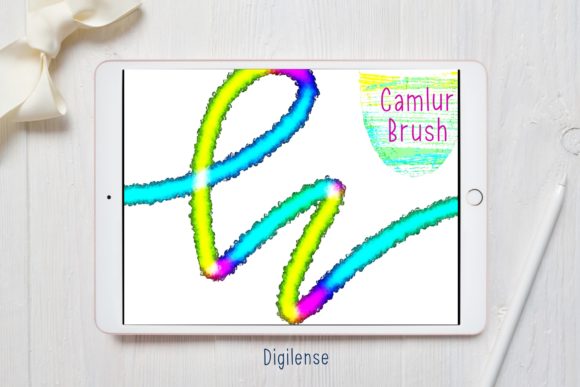
Digital lettering has revolutionized how artists, designers, and hobbyists approach typography, offering a level of flexibility and undo-button convenience that traditional ink and paper simply cannot match. However, the transition to digital often comes with a steep learning curve, particularly when trying to replicate the organic flow and varying stroke weights of hand-lettered scripts. This is where the Procreate Lettering Brush - Camlur becomes an indispensable tool for creators looking to bridge the gap between analog warmth and digital precision. Whether you are designing wedding invitations, creating social media graphics, or simply practicing your script, having the right brush engine can transform a frustrating experience into a fluid, enjoyable creative session.
The journey to beautiful lettering often begins with the struggle against stiff, uniform lines that lack character. Many standard brushes in default libraries feel too rigid or fail to respond accurately to pressure sensitivity, resulting in work that looks obviously digital rather than hand-crafted. Artists frequently find themselves spending more time tweaking settings than actually creating. The Procreate Lettering Brush - Camlur addresses these specific pain points by providing a pre-calibrated tool designed to mimic the natural taper and swell of a real brush pen. By eliminating the need for complex configuration, it allows users to focus entirely on the artistry of their strokes, ensuring that every upstroke is delicate and every downstroke carries the appropriate weight.
Streamlining Your Workflow with Ready-to-Use Assets
One of the most significant advantages of acquiring a specialized asset like the Procreate Lettering Brush - Camlur is the comprehensive nature of the package. It is not merely a single brush file; it is a complete toolkit designed to get you started immediately. When you download this resource, you receive a ZIP file containing the lettering Procreate brush, a curated color palette, and a detailed PDF guide on installation. This holistic approach recognizes that successful lettering requires more than just a good brush; it demands harmonious colors and the technical know-how to set everything up correctly.
The included color palette is particularly valuable for those who may feel overwhelmed by the infinite choices available in the digital spectrum. Curated specifically to complement the style of the Camlur brush, these colors help ensure that your final compositions look professional and cohesive right from the start. Instead of wasting time hunting for the perfect shade of sage green or dusty rose, you can apply the provided swatches and begin lettering instantly. This efficiency is crucial for professionals working under tight deadlines or students who need to maximize their practice time.
Simplified Installation for Immediate Creation
Technical barriers should never stand in the way of creativity, yet installing custom brushes can sometimes be confusing for new iPad users. The process for the Procreate Lettering Brush - Camlur is designed to be as straightforward as possible, ensuring that you spend less time troubleshooting and more time drawing. Upon receiving your download, you will have a ZIP file that needs to be uncompressed. If you do not have a built-in method to do this, you can use a free app like FileExplorer File Manager or iZip to unzip the file efficiently.
Once the file is unzipped, the integration with Procreate is seamless. You simply choose "Open in Procreate" from your file manager. If this option does not appear immediately, there is a reliable manual alternative. Open a new canvas in Procreate and tap the paintbrush icon to access the Brushes panel. At the top of the brush list, you will see a button with a plus sign or an import option; tapping this allows you to locate the folder containing your downloaded brush. Simply tap on the Procreate Lettering Brush - Camlur file, and it will instantly load into your library, ready for use. The accompanying PDF guide walks you through these steps with visual aids, ensuring that even those less familiar with iPad file management can succeed without frustration.
Practical Applications and Creative Outcomes
The versatility of the Procreate Lettering Brush - Camlur makes it suitable for a wide array of projects. For small business owners, this brush is ideal for creating eye-catching logos, packaging designs, and promotional materials that require a personal, hand-made touch. The brush's ability to handle varying pressures means it excels in both bold, impactful headlines and delicate, intricate subtexts. Social media managers will find it invaluable for crafting engaging stories and posts that stand out in a crowded feed, as the organic texture of the brush adds a layer of authenticity that resonates with audiences.
Educators and workshop leaders can also leverage this tool to teach lettering fundamentals. Because the brush behaves predictably and mimics traditional tools, it serves as an excellent teaching aid for demonstrating stroke order and pressure control. Students can practice repeatedly without the mess of ink or the cost of paper, allowing them to build muscle memory faster. Furthermore, the brush performs exceptionally well when combined with Procreate's blending modes and layer styles, enabling artists to add textures, shadows, and depth to their lettering for a truly three-dimensional effect.
Tailoring the Experience to Different User Levels
Different users will approach the Procreate Lettering Brush - Camlur with varying goals, and the tool adapts well to these diverse needs. Beginners often struggle with consistency, finding it difficult to maintain uniform slant and spacing. The Camlur brush helps mitigate this by offering a smooth glide that encourages steady hand movement, making it easier to achieve clean lines even while learning. For these users, the focus should be on mastering basic strokes and utilizing the included color palette to understand contrast and hierarchy.
Advanced artists, on the other hand, may look to push the boundaries of what the brush can do by combining it with custom textures or animation assist features in Procreate. They might use the Procreate Lettering Brush - Camlur as a base layer for complex compositions, adding flourishes and decorative elements that require high precision. The responsiveness of the brush allows for rapid sketching and iteration, which is essential for professionals refining concepts for client presentations. Regardless of skill level, the common outcome is a reduction in friction between the artist's intent and the final digital output.
In conclusion, elevating your digital lettering game requires tools that empower rather than hinder your creativity. The Procreate Lettering Brush - Camlur offers a robust solution to the common challenges of digital calligraphy, providing a natural feel, essential resources, and an easy setup process. By integrating this brush into your workflow, you unlock the potential to create stunning, professional-grade typography with confidence and ease. Whether you are drafting your first piece of hand-lettering or expanding your professional design arsenal, this tool provides the foundation you need to succeed in the vibrant world of digital art.