Unleash Wild Textures with 15 Animal Skins Procreate Brushes
In the fast-paced world of digital design, texture is often the missing ingredient that separates a flat, generic mockup from a piece that feels tactile and alive. While vector graphics and clean lines have their place, there is a growing demand for organic, raw elements that bring a sense of nature and movement to brand identity and editorial design. The 15 Animal Skins Seamless Procreate Brush set answers this call by offering a curated collection of high-fidelity patterns directly within your iPad workflow. This isn't just about slapping a leopard print on a background; it's about integrating the intricate details of the wild into fashion illustrations, packaging concepts, and social media assets with precision and ease.
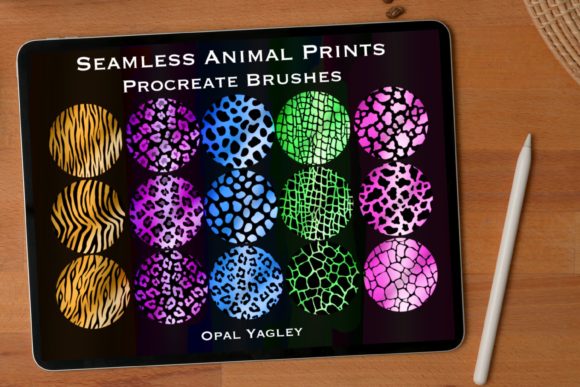
Designed specifically for the Procreate App on iPad and iPad Pro, this brush set bypasses the need for complex layer masks or external image imports. Each of the fifteen brushes functions as a seamless stamp, allowing you to paint continuous patterns of leopard, cheetah, zebra, and other safari-inspired skins without worrying about visible edges or repetitive tiling errors. The visual characteristics of these brushes are rooted in realism. Unlike cartoonish interpretations often found in free asset packs, these textures capture the irregularity of natural fur and hide. The spots vary in size and density, and the stripes possess the subtle imperfections found in nature. This level of detail adds a layer of sophistication to your work, making it suitable for high-end fashion design projects where authenticity matters.
Transforming Digital Canvases with Organic Patterns
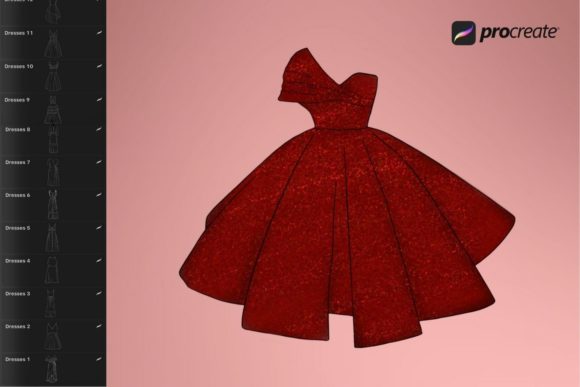
The primary strength of the 15 Animal Skins Seamless Procreate Brush lies in its versatility across different creative disciplines. For fashion designers sketching on an iPad Pro, these brushes serve as an instant way to visualize fabric choices. Instead of spending hours rendering fur texture manually, you can apply a cheetah pattern to a coat illustration in seconds, allowing you to focus on the garment's silhouette and drape. This efficiency is crucial when presenting concepts to clients or building a portfolio that needs to look polished quickly.
Beyond fashion, these tools are invaluable for packaging design and product branding. Imagine creating a label for a luxury candle or a line of organic skincare products. Using a subtle zebra stripe as a background texture can evoke a sense of exoticism and premium quality without overwhelming the logo or product information. Because the brushes are seamless, they work perfectly for wrapping designs around cylindrical objects in mockups, ensuring the pattern flows naturally around the curve. Marketers and content creators can also leverage these assets to create eye-catching social media graphics. In a feed dominated by solid colors and gradients, a post featuring a textured animal skin border or background can stop the scroll and increase engagement.
It is important to note the technical constraints to ensure you get the most out of this tool. These brushes are engineered exclusively for the Procreate ecosystem. You will need an iPad (standard or Pro model) with the Procreate app installed to utilize them. They do not function in Adobe Photoshop, Illustrator, or other desktop-based design software. This limitation ensures that the brushes take full advantage of Procreate's engine, providing smooth strokes and accurate texture mapping that might be lost in translation to other platforms. By keeping the workflow contained within the iPad environment, designers can maintain a fluid, hands-on creative process from sketch to final export.
Elevating Brand Perception Through Texture
Texture plays a subtle but powerful role in how an audience perceives a brand. When used effectively, animal skin patterns can convey specific personality traits: boldness, luxury, wildness, or connection to nature. The 15 Animal Skins Seamless Procreate Brush set allows you to control this narrative precisely. For a brand aiming to project confidence and power, a bold leopard print used in a logo design accent or promotional material can be incredibly effective. Conversely, for a brand focused on earthiness and organic ingredients, a softer, more muted skin texture can reinforce those values without needing explicit text.
Consistency is key in building brand identity. With fifteen distinct variations included in the single file download, you have a wide palette of textures to choose from, ensuring you can find the perfect match for your specific project needs. Whether you need the classic black-and-white contrast of a zebra or the warm, golden tones of a lioness, having a unified set of brushes ensures that your textures share a consistent resolution and style. This consistency helps in maintaining professionalism across various touchpoints, from business cards to website banners. When your visual assets feel cohesive, it builds trust with your audience and strengthens brand recognition.
Furthermore, these brushes influence visual hierarchy. In web design or digital publications, using a textured background can push foreground elements like text and calls-to-action forward, creating depth. However, readability must always remain a priority. When applying these busy patterns, it is often best to use them in areas with ample whitespace or to lower their opacity so they act as a subtle undertone rather than a distraction. Testing your designs on actual devices before finalizing is a recommended practice to ensure the texture enhances rather than detracts from the user experience.
Practical Strategies for Integration and Pairing
Integrating the 15 Animal Skins Seamless Procreate Brush into your workflow requires a thoughtful approach to composition. Since animal prints are inherently busy, they pair best with clean, simple typography. If you are designing a poster or an ad, consider pairing these textured backgrounds with a strong sans serif font or a minimal serif font. Avoid combining them with overly decorative script fonts or handwritten fonts, as the competition between the complex texture and the intricate letterforms can result in visual clutter that is hard to read.
When evaluating project fit, ask yourself what emotion you want to evoke. Are you designing for a summer festival, a winter fashion launch, or a wildlife conservation campaign? The context dictates which skin pattern works best. For example, a zebra pattern might feel too stark for a cozy winter campaign but perfect for a modern, architectural interior design presentation. Always test your brush strokes at different sizes. What looks detailed and rich at a large scale might turn into a muddy gray blob when scaled down for a mobile icon. Procreate allows you to adjust the size and opacity of the brush dynamically, giving you the control to fine-tune the texture for any medium.
From a licensing perspective, understanding the terms of your design assets is vital for commercial work. This brush set is designed to empower creators, whether you are a freelancer selling templates or a small business owner creating your own marketing materials. Having a reliable library of premium textures saves time and reduces the reliance on stock photography, which can sometimes feel overused or generic. By painting your own textures, you create unique compositions that belong entirely to you, adding a layer of originality to your commercial font and graphic projects.
Ultimately, the value of the 15 Animal Skins Seamless Procreate Brush set comes from its ability to bridge the gap between digital convenience and organic beauty. It invites designers to "go wild" with their creativity while maintaining the precision required in professional settings. Whether you are illustrating a children's book, designing a limited-edition sneaker, or crafting a bold Instagram story, these brushes provide the tools to make your digital art feel tangible. Embrace the texture, experiment with the seamless patterns, and let the natural world inspire your next great design.