Unlock Whimsical Art with Procreate Brush Stamp 15 Mushrooms
Digital illustration offers limitless possibilities, but sometimes the gap between a blank canvas and a finished piece feels widest when you are trying to add those final charming details. This is where specialized tools like the Procreate Brush Stamp 15 Mushrooms collection come into play. Designed specifically for the iPad ecosystem, these cute stamps allow artists to decorate graphics, enhance doodles, and enrich drawings with minimal effort. Whether you are a professional illustrator looking to speed up your workflow or a hobbyist wanting to make your journal entries more vibrant, understanding how to properly integrate these assets is key to getting the best results.
The appeal of mushroom-themed brushes lies in their versatility. Nature motifs are timeless in design, fitting seamlessly into fantasy landscapes, whimsical character designs, or even modern branding projects that require a touch of organic softness. However, many users jump into downloading and using digital brush sets without checking the fine print, leading to frustration when the files do not behave as expected. By approaching this tool with a clear understanding of its requirements and limitations, you can ensure a smooth creative experience.
Understanding Compatibility Before You Begin
The most common oversight when acquiring new digital assets is ignoring system requirements. It is crucial to remember that the Procreate Brush Stamp 15 Mushrooms set is built exclusively for the Procreate app on the iPad. A frequent mistake occurs when users attempt to import these files into Photoshop, Clip Studio Paint, or desktop versions of illustration software. Unfortunately, the proprietary .brushset format does not translate to other applications. Trying to force these files into incompatible software will result in error messages and wasted time.
Furthermore, version control matters. To utilize these stamps effectively, your Procreate app must be updated to version 5.0 or higher. Older versions of the software may not recognize the stamp engine or the specific metadata embedded in the file. Before you purchase or download, take a moment to check your App Store updates. Ensuring your software is current prevents the disappointment of buying a tool you cannot immediately use. This simple verification step saves you from potential refund requests and keeps your creative momentum intact.
Avoiding Workflow Bottlenecks
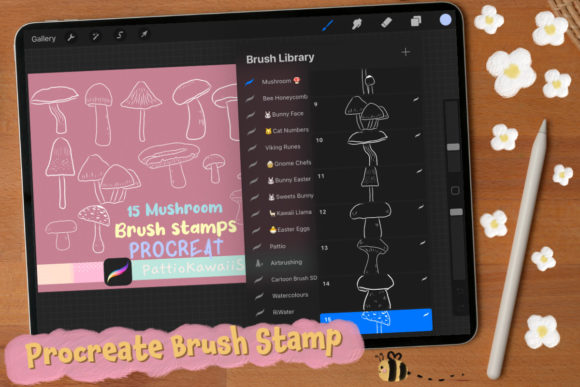
Once you have confirmed your device and software are ready, the next hurdle is often how the brushes are applied within a project. The package includes a single .brushset file containing 10 unique stamps. A common misunderstanding is treating these stamps like standard painting brushes. While they can be used with varying opacity and color, their primary function is "stamping." Some beginners struggle because they try to drag the stylus across the screen to create a textured line, expecting a continuous mushroom trail. While some brushes allow this, stamp brushes are designed to place a distinct image with each tap.
To avoid cluttered or messy results, adjust your approach. Select the brush, choose your desired color from the palette, and simply tap the canvas. If you need to resize the mushroom to fit a specific composition, use the two-finger pinch gesture or adjust the size slider at the top of the interface before stamping. Resizing after stamping requires selecting the layer and using the transform tool, which adds unnecessary steps to your workflow. By setting your size and opacity before you stamp, you maintain a cleaner layer structure and work much faster.
Maximizing Creative Potential
These mushroom stamps are not just for drawing forests. Their utility extends far beyond literal interpretations of nature. Marketers and small business owners can use them to create eye-catching social media graphics or logo accents that convey growth and organic values. Bloggers might use them as bullet points or section dividers to break up text visually. The key is to experiment with blending modes and layer effects.
For instance, placing a mushroom stamp on a separate layer and changing the blending mode to "Multiply" or "Overlay" can integrate it naturally into a textured background, making it look painted rather than pasted. Conversely, leaving it on a normal layer with a drop shadow can create a sticker-like aesthetic popular in digital planning. The mistake here is sticking to the default black or brown colors. These brushes are fully recolorable. Changing the hue to neon pink, electric blue, or pastel gold can completely transform the mood of your artwork, turning a rustic scene into a sci-fi landscape or a children's book illustration.
Quality Control and Organization
As you accumulate more digital assets, organization becomes critical. A frequent issue among creators is losing track of which brush set contains specific elements. After importing the Procreate Brush Stamp 15 Mushrooms, immediately rename the brush set within the Procreate library if the default name is generic. Group it with other nature or texture brushes. This habit ensures that when you are in the middle of a deadline, you are not scrolling through hundreds of unnamed brushes trying to find that specific toadstool shape.
Additionally, consider the resolution of your canvas. While vector graphics scale infinitely, raster-based stamps like these rely on pixel density. If you create a tiny canvas and then stretch a stamped mushroom to fill the screen, the image will appear pixelated and blurry. Always start with a canvas size appropriate for your final output, especially if you intend to print your work. For high-quality prints, ensure your DPI settings are at least 300 before you begin stamping. This proactive measure guarantees that your cute decorations remain crisp and professional, regardless of how large you scale them.
Making an Informed Decision
Before adding this tool to your arsenal, evaluate your current needs. If your workflow involves heavy texturing, pattern creation, or whimsical character design, this set offers significant value by reducing the time spent drawing repetitive elements manually. However, if you strictly work in photo-realism or technical drafting, these stylized stamps may not align with your goals. There is no shame in recognizing that a specific tool is not right for your current project; doing so saves money and declutters your digital workspace.
Ultimately, the Procreate Brush Stamp 15 Mushrooms collection is a fantastic resource for adding instant charm and efficiency to your digital art. By respecting the platform limitations, mastering the stamping technique, and organizing your library effectively, you transform a simple download into a powerful component of your creative toolkit. Remember, the best tools are the ones you understand deeply. Take the time to read the included instructions, verify your iPad and Procreate version, and then let your imagination run wild. With the right preparation, these ten little stamps can help you create worlds that are easier to build, quicker to finish, and infinitely more fun to explore.