Unlocking Digital Floral Art with the Watercolour Rose Procreate Toolkit
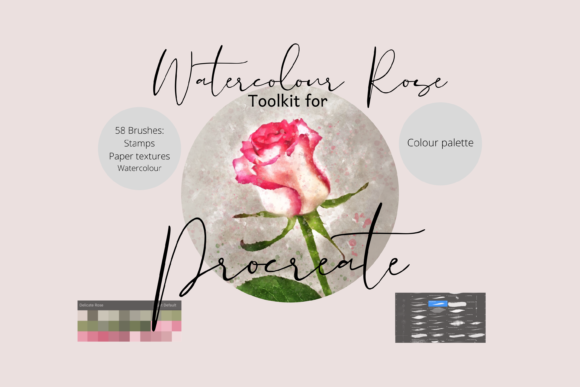
The transition from traditional media to digital art often leaves creators missing the organic unpredictability of watercolour. There is a specific charm in how pigment bleeds into wet paper, how edges soften, and how layers build up to create depth without looking muddy. For iPad artists seeking to replicate this delicate aesthetic without the mess of physical supplies, the Watercolour Rose Procreate Toolkit offers a comprehensive solution. This collection is not merely a set of stamps; it is a robust ecosystem designed to bridge the gap between hand-drawn authenticity and digital efficiency.
At its core, this toolkit addresses a common frustration among digital painters: the "plastic" look that often plagues digital illustrations. By utilizing 58 unique individual hand-drawn digital brushes, the pack provides the texture and variance necessary to create artwork that feels alive. Whether you are a seasoned illustrator or a hobbyist looking to elevate your DIY projects, understanding how to leverage these tools can transform your workflow and output quality.
Beyond Simple Stamps: A Dynamic Painting Experience
Many users approach brush packs expecting only static images to drop onto a canvas. However, the true power of the Watercolour Rose Procreate Toolkit lies in its dynamic capabilities. The inclusion of blending brushes, drip effects, and spatter tools allows artists to simulate the physics of real watercolour. When you apply a stroke, the brush responds to pressure and tilt, creating tapered ends and variable opacity that mimic a real sable brush.
The ability to resize and recolour every element is a game-changer for versatility. Unlike physical watercolours, where mixing a new shade requires time and clean water, digital brushes allow for instant experimentation. You can take a deep crimson rose stamp, shift the hue to a soft blush pink, and adjust the saturation to fit a pastel wedding invitation—all within seconds. This flexibility makes the toolkit ideal for print on demand businesses where color consistency across different products is crucial.
Furthermore, the paper textures included in the pack serve as more than just background noise. They interact with the painting brushes, creating a granulation effect that grounds the digital image. This interaction prevents the artwork from looking flat, adding a tactile quality that viewers subconsciously associate with high-quality traditional art.
Ideal Applications for Makers and Designers
The utility of this brush pack extends far beyond creating standalone gallery pieces. For the modern maker, these assets are the building blocks of a diverse product line. Consider the world of greetings cards. A handmade feel is often the selling point for independent card designers. Using the rose stamps as a base, you can quickly assemble intricate floral arrangements that look hand-painted but take a fraction of the time to produce.
Scrapbooking has also evolved into the digital realm. Digital scrapbookers can use the spatter and drip brushes to create realistic backgrounds that frame photos beautifully. The Delicate Rose palette included in the download ensures that all your elements share a cohesive color story, removing the guesswork from color theory. This is particularly useful for creating themed albums or memory books where visual harmony is essential.
For those involved in the invitation industry, speed and customization are key. Wedding and event invitations often require specific color matches to bridal party attire or venue decor. With these brushes, you can offer clients custom floral motifs that are unique to their event while maintaining the artistic integrity of a hand-painted design. The same assets can be scaled up for large format wall art or scaled down for intricate wrapping paper patterns, proving the scalability of the vector-like quality of these raster brushes when used at high resolutions.
Technical Requirements and Setup
Before diving into creation, it is vital to understand the ecosystem required to run the Watercolour Rose Procreate Toolkit. These files are proprietary to the Procreate app, meaning they will not function in Photoshop, Illustrator, or other graphic design software. To utilize this toolkit effectively, you must have an iPad Pro (or a compatible iPad model) with the Procreate app installed. Additionally, using an Apple Pencil is highly recommended, if not strictly necessary, to fully exploit the pressure sensitivity and tilt features that give the brushes their natural feel.
The installation process involves a few specific steps that might be new to those unfamiliar with iOS file management. Since the brushes come in a compressed format to save space, you will need a platform to download the files, such as iCloud, and a utility program to unzip them, like iZip. Once downloaded to your device, you simply tap the file to extract it, then import the resulting folder directly into Procreate. Inside the app, these brushes will appear in a named folder, keeping your library organized and ensuring you can find the specific rose stamp or texture brush you need instantly.
Maximizing Workflow Efficiency
Integrating this toolkit into a professional workflow requires a shift in mindset. Instead of viewing the stamps as a shortcut, view them as a foundation. A common strategy is to use the rose stamps as an underpainting or a guide. You can place a stamp to establish the composition and lighting, then use the dynamic painting brushes to add unique details, shadows, and highlights that make the piece entirely your own. This hybrid approach saves hours on sketching while ensuring the final result is not generic.
For print-on-demand entrepreneurs, the ability to recolor assets rapidly means you can test multiple design variations in a single session. You might create a series of phone cases featuring the same rose motif but in ten different seasonal colorways. The Delicate Rose palette accelerates this process by providing pre-selected harmonious colors, reducing decision fatigue and allowing you to focus on layout and composition.
It is also worth noting the importance of layer management when working with textured brushes. Because the pack includes separate texture overlays, you can experiment with blend modes like "Multiply" or "Overlay" to see how the paper grain interacts with your ink. This level of control allows for fine-tuning the final export, ensuring that whether the image is viewed on a retina screen or printed on matte cardstock, the texture remains perceptible and appealing.
Why Hand-Drawn Digital Brushes Matter
In an age where AI-generated imagery is becoming ubiquitous, the value of human-curated, hand-drawn assets has arguably increased. The Watercolour Rose Procreate Toolkit stands out because every brush stroke was originally created by a human hand. This imparts a subtle irregularity and warmth that algorithms often struggle to replicate convincingly. When customers buy a greeting card or a piece of wall art, they are often paying for that human touch—the evidence of an artist's intent and skill.
Using these brushes allows digital artists to maintain their unique voice while leveraging technology to scale their production. It eliminates the barrier of entry for those who love the look of watercolour but lack the confidence or space to manage wet media. Conversely, for traditional artists, it offers a way to digitize their work without losing the essence of their style.
Ultimately, the decision to adopt this toolkit comes down to the desire for quality and efficiency. It is not just about having pretty roses; it is about having a reliable set of tools that behave predictably yet organically. From the initial download via iCloud to the final export of a high-resolution file for a client, every step is designed to support a seamless creative journey. Whether you are designing a full stationery suite or simply journaling for pleasure, the versatility and depth of these 58 brushes provide a rich playground for artistic expression.
As you explore the possibilities, remember that the best results often come from experimentation. Mix the spatter brushes with the smooth blending tools. Layer the textures over solid colors. Use the palette as a starting point, then push the boundaries of what the digital medium can do. The Watercolour Rose Procreate Toolkit is more than a product; it is an invitation to redefine what digital floral art can be.