Choosing the Right Digital Assets: A Guide to Easter Procreate Stamps and Brushes
As digital art tools evolve, creators are increasingly looking for efficient ways to produce high-quality seasonal content without starting every project from a blank canvas. Easter Procreate Stamps represent a specific category of digital assets designed to streamline the creation of spring-themed artwork. Unlike standard image files that must be imported and manipulated individually, these assets function as custom brushes within the Procreate ecosystem. This distinction is critical for artists evaluating whether to invest time in hand-drawing elements or to utilize pre-made digital tools to enhance their workflow.
These hand-drawn digital brushes are engineered for versatility, serving both continued digital crafting and the production of physical printed goods. The core value proposition lies in their adaptability; the clip art elements included in such packs can be seamlessly integrated into greetings cards, scrapbooking layouts, invitations, wall art, and wrapping paper designs. For those exploring print-on-demand business models, these stamps offer a scalable way to generate unique patterns and illustrations quickly. However, understanding the technical requirements and limitations is essential before making a purchase decision.
Distinguishing Stamps from Standard Clip Art
When comparing Easter Procreate Stamps to traditional PNG clip art libraries, the primary difference is interactivity and workflow integration. Standard clip art consists of static images that you place on a canvas. While useful, they often require separate layers for each element and can become cumbersome to manage in complex compositions. In contrast, a brush stamp allows the user to "paint" the image onto the canvas. This means you can vary the size, rotation, and opacity dynamically as you work, creating more organic and less repetitive patterns.
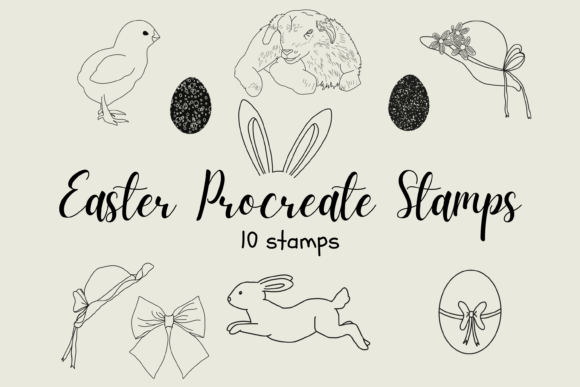
A typical pack of these digital brushes might include 10 unique stamp designs. The ability to resize these elements using the brush resize tool directly within the interface, or by using the move and resize tool after application, provides a level of control that static imports lack. Furthermore, a significant advantage of high-quality brush packs is their transparency settings. These files are typically PNG-based and non-opaque, meaning they do not have a white background box around them. This feature is vital for layering; users can set a color layer beneath the outline stamp to instantly change the fill color without needing to use complex selection tools or magic wands. This non-destructive editing capability saves considerable time during the design process.
Technical Prerequisites and Compatibility
Before deciding if this resource fits your needs, it is imperative to evaluate your current hardware and software setup. These files are exclusive to the Apple ecosystem. Specifically, they will only work within the Procreate App installed on an iPad. To utilize them effectively, an Apple Pencil is generally required for precise control, although touch input can suffice for basic stamping. It is important to note that these brushes will not function on Android tablets, Windows PCs, or desktop versions of illustration software like Photoshop or Illustrator unless those programs have specific, often incompatible, brush import features.
The installation process also requires a specific workflow that may differ from downloading standard apps. Users need a platform to download the files, such as iCloud Drive or Dropbox, and a utility program capable of unzipping compressed files, such as iZip. Once the archive is extracted, the individual brush files must be imported into Procreate, where they will reside in a named folder within the brush library. For individuals unfamiliar with file management on iOS, this initial setup can present a slight learning curve compared to simply opening a JPEG file. However, once installed, the assets are permanently available within the app, ready for immediate use in any project.
Evaluating Use Cases: When to Choose Stamps vs. Hand-Drawing
The decision to use Easter Procreate Stamps often comes down to a trade-off between originality and efficiency. For professional designers working on tight deadlines for client projects like holiday invitations or commercial wrapping paper, these stamps provide a consistent aesthetic without the hours required to draw eggs, bunnies, or floral motifs from scratch. They ensure a cohesive look across a series of designs, which is difficult to achieve when drawing freehand under time pressure.
Conversely, for artists whose primary goal is skill development or creating highly unique, one-of-a-kind fine art pieces, relying too heavily on stamps might limit creative growth. In these scenarios, stamps serve best as accent elements rather than the focal point. For example, a digital painter might hand-paint a detailed landscape but use a grass or flower stamp to add texture to the foreground quickly. This hybrid approach leverages the strengths of both methods: the uniqueness of hand-drawn art and the efficiency of digital assets.
Consider the end product when making your choice. If the goal is to create a pattern for print-on-demand services, the repeatability of brush stamps is a massive asset. You can scatter elements across a canvas to create a seamless texture in minutes. However, if the project requires specific, custom characters or intricate details that do not exist in the 10 unique stamps provided in a standard pack, the user may find the limited variety restrictive. In such cases, purchasing multiple packs or combining stamps with hand-drawn elements becomes necessary.
Color Customization and Layer Management
One of the most practical features of these digital brushes is the ease of color customization. Because the stamps are essentially outlines with transparent fills, the workflow for coloring is intuitive. By placing a solid color layer beneath the layer containing the stamped outline, the color shows through the transparent areas. This method allows for rapid experimentation with different color palettes—a crucial factor when designing for different brands or personal preferences. Users can duplicate the outline layer and place different colored layers underneath to create variations of the same design instantly.
This layering technique also facilitates easy editing. If a mistake is made, only the specific layer needs adjustment, leaving the rest of the composition intact. This non-destructive workflow is superior to flattening images, a common pitfall when working with lower-quality clip art. For scrapbookers and invitation designers, this flexibility means they can match the Easter elements perfectly to existing color schemes without needing advanced recoloring skills.
Making an Informed Decision
Ultimately, Easter Procreate Stamps are a specialized tool best suited for iPad artists who value speed and consistency in their seasonal projects. They are an excellent investment for small business owners creating DIY products, hobbyists looking to enhance their digital planning, and designers needing reliable assets for commercial print goods. The hand-drawn nature of the brushes adds a human touch that purely vector-based or geometric alternatives often lack, appealing to audiences who appreciate artisanal aesthetics.
However, they are not a universal solution. If you do not own an iPad or prefer working in vector-based environments like Adobe Illustrator, these brushes will be unusable. Additionally, if your artistic style relies heavily on hyper-realism or styles that clash with hand-drawn outlines, these stamps may not integrate well. It is advisable to review the specific style of the 10 included brushes to ensure they align with your existing portfolio before downloading.
In the broader context of digital resources, these stamps occupy a middle ground between full illustration courses and static stock photo sites. They offer a practical shortcut that respects the artist's need for customization while eliminating the repetitive labor of drawing common symbols. By understanding the technical requirements—such as the need for Procreate, an Apple Pencil, and file unzipping utilities—users can avoid frustration and immediately leverage these tools to elevate their Easter-themed creations. Whether for a single greeting card or a large-scale print run, the right digital assets can significantly enhance productivity and creative output.