Evaluating the Lollipop Bright Procreate Brush for Vibrant Digital Illustration
Digital artists working within the Procreate ecosystem on iPad are constantly seeking tools that streamline their workflow while expanding their creative palette. Among the myriad of texture and effect brushes available, the Lollipop Bright Procreate Brush has emerged as a specific utility for adding celebratory and high-energy elements to artwork. This tool is not a comprehensive painting suite but rather a specialized asset designed to solve a particular visual problem: creating instant, multi-colored confetti effects with a single stroke. Understanding where this brush fits into a broader digital art toolkit requires an honest evaluation of its capabilities, limitations, and how it compares to manual creation methods or alternative texture packs.
Defining the Utility of Single-Stroke Confetti Tools
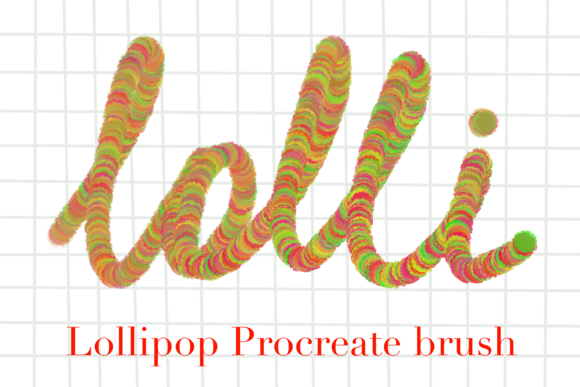
The primary function of the Lollipop Bright Procreate Brush is to generate scattered, multi-colored particles that resemble confetti. In traditional digital illustration, achieving this look manually involves creating individual shapes, varying their hues, rotating them, and scattering them across the canvas—a process that can be time-consuming and often results in a pattern that looks too uniform or repetitive. This brush consolidates those steps into a single gesture. By leveraging Procreate's brush engine capabilities regarding shape dynamics and color jitter, the tool deposits a variety of colors and orientations instantly.
What makes this specific brush distinct is its focus on "bright" aesthetics. The color palette embedded within the brush dynamics is typically saturated and high-contrast, intended for projects requiring a festive or pop-art feel. Unlike grayscale texture brushes that rely on the artist's current color choice, this tool comes with pre-defined color variations. This is a significant trade-off: it offers speed and consistency in color theory but reduces the artist's immediate control over the specific hue of each particle without further editing. For users looking to add immediate visual interest to backgrounds, greeting cards, or social media graphics, this automation is a substantial efficiency gain.
Comparing Automated Effects vs. Manual Customization
When evaluating whether to incorporate the Lollipop Bright Procreate Brush into your library, it is essential to compare it against the alternative approach: building custom confetti from scratch or using generic particle brushes. Manual creation offers the highest degree of fidelity. An artist can ensure every piece of confetti matches the exact lighting conditions of the scene, cast appropriate shadows, and adhere to specific perspective grids. However, the time investment is high. For quick turnarounds, such as daily sketches, mockups, or content creation for social platforms, the manual approach is often impractical.
Generic particle brushes serve as a middle ground. Many standard Procreate libraries include spray or noise brushes that can mimic texture. However, these often lack the specific "cut paper" or "shiny foil" look that a dedicated confetti brush provides. Generic sprays tend to look like dust or fog unless heavily manipulated with blending modes and opacity settings. The Lollipop Bright Procreate Brush bridges this gap by providing defined shapes rather than amorphous dots. The decision factor here lies in the project's requirement for specificity. If the artwork demands photorealistic integration of debris, a manual approach or a more complex particle system might be necessary. If the goal is stylized vibrancy and speed, this specialized brush is likely the superior choice.
Technical Considerations and File Management
From a technical standpoint, acquiring this tool involves a straightforward digital download process. Upon purchase, the user receives a file packaged in a ZIP archive. It is critical to note that iPads do not automatically unzip files upon download in the same way desktop computers might. Users must navigate to their Files app, locate the downloaded archive, and explicitly extract the contents before importing the brush file into Procreate. This is a common friction point for new digital artists; understanding that the listing is for an instant download means there is no physical shipment, but it does require basic file management literacy.
Once extracted, the installation is standard for Procreate assets. The brush is designed to be versatile within the software's constraints. While the creator, Margarita, encourages users to share their creations to foster community engagement, the license generally permits broad usage rights for personal and commercial projects, though verifying the specific terms included in the download is always advisable. The simplicity of the delivery method—single file, instant access—aligns well with the needs of professionals who need to expand their toolkit without waiting for shipping or complex activation codes.
Ideal Use Cases and Limitations
Determining when to use the Lollipop Bright Procreate Brush depends largely on the style of the final output. This tool excels in contexts such as:
- Greeting Card Design: Birthday, anniversary, or celebration cards benefit immensely from the ready-made festive look.
- Social Media Graphics: Quick posts celebrating milestones or holidays where eye-catching color is prioritized over subtle realism.
- Background Textures: Adding depth to flat illustrations without cluttering the layer stack with hundreds of individual elements.
- Mood Boards and Mockups: Rapidly visualizing a celebratory concept for client approval.
However, there are scenarios where this brush may not be the optimal solution. Because the color distribution is randomized within the brush engine, artists working on pieces with strict, limited color palettes may find the automatic colors clash with their composition. While it is possible to mask or recolor the result, doing so negates some of the time-saving benefits. Additionally, for large-scale prints where resolution is paramount, relying on a stamped brush texture can sometimes reveal repetition patterns if not used with varying pressure and size dynamics. In high-end editorial illustration where every element must be unique and purposeful, a hand-drawn approach remains the gold standard.
Making an Informed Decision
Ultimately, the value of the Lollipop Bright Procreate Brush lies in its ability to act as a force multiplier for specific types of creativity. It is not a replacement for fundamental drawing skills, nor is it a catch-all solution for texture needs. Instead, it is a specialized instrument in a larger toolbox. For adults exploring digital art resources, the question is not whether this brush is "better" than drawing confetti by hand, but whether it fits the workflow requirements of speed versus control.
If your projects frequently involve themes of celebration, joy, or high-energy marketing, having a reliable, one-click solution for confetti effects can significantly reduce production time. Conversely, if your work leans towards hyper-realism or requires absolute control over every pixel's color value, you may find the pre-set nature of the brush limiting. The best approach for many artists is to view such downloads as complementary assets. They handle the heavy lifting of scattering and coloring, allowing the artist to focus on composition, lighting, and narrative.
Before finalizing a decision, consider the format of your typical deliverables. If you are producing content rapidly for digital consumption, the instant gratification and vibrant output of this tool align perfectly with those goals. If you are creating fine art prints or detailed storyboards, you might use this brush for initial blocking or background filler but switch to manual methods for focal points. By understanding these trade-offs, you can integrate the Lollipop Bright Procreate Brush effectively, ensuring it enhances your workflow rather than constraining your artistic vision.