ABC Alphabet Fonts: Procreate Brush Stamps
Digital lettering often feels like a balancing act between artistic freedom and technical precision. For many creators, the desire to add custom text to illustrations, planners, or social media graphics is frequently halted by the time-consuming process of drawing each character by hand or wrestling with rigid typefaces that lack personality. This is where Procreate Brush Stamp ABC Alphabet Fonts step in to bridge the gap. These are not traditional fonts you install on a computer; rather, they are specialized stamp brushes designed specifically for the Procreate app on iPad. They function as a collection of pre-drawn alphabet letters and numbers that you can "stamp" onto your canvas instantly, offering a unique blend of hand-crafted charm and digital efficiency.
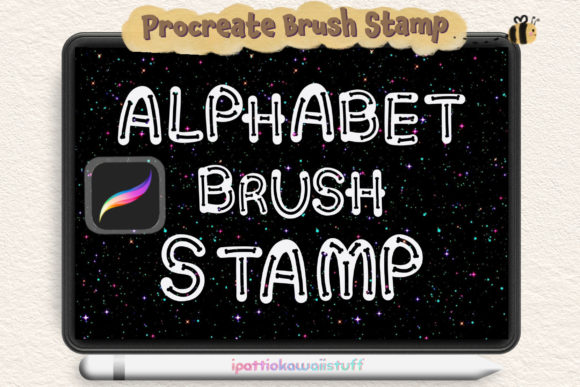
The core appeal of these tools lies in their simplicity and versatility. Imagine having a complete set of bone-style alphabet letters and numbers ready to use at the tap of a stylus. Unlike standard typography, which can sometimes feel cold or disconnected from a hand-drawn illustration, these stamps maintain an organic, doodle-like aesthetic. They are perfect for decorating graphics, enhancing journal entries, or adding playful captions to your artwork without breaking your creative flow. The process is incredibly intuitive: you simply select the brush, choose your desired color and opacity, resize the stamp to fit your composition, and apply it. This workflow eliminates the need for perfect penmanship while ensuring every letter looks consistent and professional.
Why Creators Are Switching to Stamp Brushes
The shift toward using stamp brushes like the ABC Alphabet Fonts set is driven by a need for speed without sacrificing style. For small business owners creating product mockups, educators designing engaging worksheets, or bloggers crafting Pinterest pins, time is a valuable resource. Hand-lettering a full sentence can take twenty minutes; stamping it takes twenty seconds. This efficiency allows you to focus more on the overall composition and message of your piece rather than getting bogged down in the mechanics of forming individual characters.
Furthermore, these brushes offer a level of customization that static font files cannot match within the Procreate environment. Because each letter is a brush stroke, you have total control over its appearance. You can lower the opacity to create a watermark effect, change the color to match your palette instantly, or scale the letters up and down without losing resolution. This flexibility makes them ideal for various contexts, from subtle background textures to bold, eye-catching headlines. The "bone" style mentioned in the set description adds a specific texture that feels tactile and grounded, making your digital art feel more human and less computer-generated.
Practical Applications for Professionals and Hobbyists
The utility of these alphabet stamps extends far beyond simple doodling. Consider the following real-world scenarios where these tools shine:
- Digital Planning and Journaling: Enhance your GoodNotes or Procreate planners with consistent, cute headers for your monthly spreads or daily logs.
- Social Media Content: Quickly generate story highlights, quote cards, or promotional graphics that maintain a cohesive brand aesthetic.
- Educational Materials: Teachers can create fun, legible flashcards or worksheet decorations that appeal to younger students without needing perfect handwriting.
- Product Design: Freelancers can mock up t-shirt designs, sticker sheets, or greeting cards rapidly to present concepts to clients.
- Personal Projects: Add personalized touches to photo edits, invitation designs, or scrapbook pages with minimal effort.
For beginners, the learning curve is virtually non-existent. There is no need to understand complex vector paths or kerning adjustments. If you can hold an Apple Pencil and navigate the Procreate interface, you can master these brushes immediately. The included set typically contains 36 stamps, covering the entire alphabet and essential numbers, ensuring you have everything needed to spell out any word or date required for your project.
Important Technical Considerations
Before diving into your new creative toolkit, it is crucial to understand the technical requirements to ensure a smooth experience. These brushes are engineered exclusively for the Apple ecosystem. Specifically, you will need an iPad or iPad Pro with the Procreate app installed. It is important to note that the app version must be 5.0 or higher to support the functionality of these stamp brushes. Older versions of the software may not render the stamps correctly or might lack the necessary engine to handle the brush dynamics.
A common point of confusion for new users is compatibility with other software. It is vital to remember that these brushes do not work in Photoshop, Illustrator, Canva, or any other desktop or mobile application. They are proprietary to the Procreate environment. Attempting to import the .brushset file into other programs will result in errors or the file simply not appearing. This limitation is due to the unique way Procreate handles brush data and stamping mechanics. However, once your design is complete in Procreate, you can easily export your artwork as a PNG or JPEG to use in other platforms for marketing or printing.
Getting Started with Your New Toolkit
Upon purchase, you will receive a single .brushset file. Installing this is straightforward: simply tap the file on your iPad, and it will automatically open in Procreate and populate your brush library. Once installed, you can find your new alphabet stamps in the brush panel. To get the best results, experiment with the size slider. While the stamps are scalable, finding the "sweet spot" where the texture of the bone-style letters looks most crisp can enhance the final look of your art. Additionally, don't be afraid to rotate the canvas or the stamp itself to create dynamic, slightly imperfect arrangements that mimic natural handwriting.
In a digital landscape saturated with generic fonts, tools like Procreate Brush Stamp ABC Alphabet Fonts offer a refreshing return to creativity. They empower you to produce high-quality, personalized content faster than ever before. Whether you are a seasoned graphic designer looking to speed up your workflow or a hobbyist eager to make your digital journals pop, these stamps provide a fun, efficient, and visually appealing solution. By understanding their specific requirements and embracing their unique capabilities, you can unlock a new level of productivity and artistic expression in your digital projects.