Sunflower Procreate Brush Stamps for iPad Art
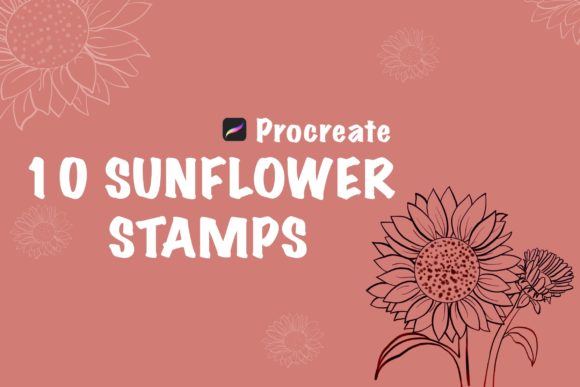
Digital illustration often hinges on the balance between technical precision and organic flow. When working on an iPad with an Apple Pencil, the tools you choose can dictate whether a session feels like a chore or a creative breakthrough. Sunflower Procreate Brush Stamps offer a specialized solution for artists who want to infuse their work with botanical warmth without spending hours painting individual petals. This collection includes ten distinct stamp brushes designed specifically for the Procreate ecosystem, allowing users to instantly populate their canvases with high-quality floral elements.
The core value of these stamps lies in their flexibility. Unlike static images pasted onto a layer, these are dynamic brush tools. You can apply them as a stamp and then immediately utilize the "fill color" feature within Procreate to change their hue to match any palette. This capability transforms a simple set of ten flowers into an endless variety of design assets, making the design process easier, quicker, and significantly more enjoyable.
Why Different Creators Choose Botanical Stamps
The appeal of Sunflower Procreate Brush Stamps varies widely depending on who is holding the Apple Pencil. What serves as a time-saving shortcut for one person might be a foundational building block for another's entire business model.
For beginners just navigating the Procreate interface, the primary draw is confidence. Drawing realistic flowers requires a nuanced understanding of light, shadow, and anatomy that takes years to master. These stamps allow a novice to create beautiful, professional-looking compositions immediately. They can focus on learning composition, color theory, and layout without getting bogged down by the frustration of imperfect linework. The instant download format means there is no waiting; once the file is imported, the learning begins.
In contrast, professional illustrators and freelancers often evaluate these tools through the lens of efficiency and reliability. When working under tight deadlines for clients, speed is currency. Having a reliable set of sunflower stamps allows a pro to block out a scene or add intricate background details in seconds rather than hours. They appreciate the ability to recolor the stamps instantly, ensuring the flora matches a client's specific brand guidelines without needing to repaint from scratch. For them, the quality of the edge and the texture of the stamp are paramount to maintaining a high-end look.
Practical Applications Across Industries
The utility of these flower stamp brushes extends far beyond fine art illustration. Various industries leverage these assets to enhance visual communication, each prioritizing different aspects of the toolset.
Small business owners and entrepreneurs frequently use digital art for social media marketing and product packaging. A boutique selling homemade soaps or organic teas might use these sunflower stamps to create cohesive branding materials. For this group, the commercial value and presentation are key. They need assets that look custom-made but don't require hiring a full-time designer. The ability to quickly generate seasonal graphics—like a summer sale banner featuring bright yellow sunflowers—allows them to stay agile in their marketing efforts.
Educators and content creators also find unique uses for botanical stamps. Teachers creating digital lesson plans or worksheets can use these flowers to decorate headers and borders, making learning materials more engaging for students. Similarly, bloggers and publishers looking to break up text-heavy articles can use these stamps as decorative dividers or featured images. For these users, ease of use is the highest priority. They need a tool that works seamlessly within their existing workflow on the iPad, requiring minimal technical setup.
Even hobbyists who have no intention of selling their work benefit from the creativity these tools unlock. Digital journaling and planning have become massive trends, and users often seek ways to personalize their digital planners. Adding a cluster of sunflowers to a weekly spread adds a touch of personality and joy to the daily routine. For this audience, the fun factor and the aesthetic pleasure of the design matter most.
Technical Workflow and Integration
Integrating new tools into a digital workflow should be frictionless. The Sunflower Procreate Brush Stamps are designed with a straightforward installation process that respects the user's time. Because they are made specifically for Procreate on the iPad, they leverage the native capabilities of the software, ensuring smooth performance and pressure sensitivity compatibility with the Apple Pencil.
To get started, the process is simple:
- Download the brush stamps directly to your iPad. You will receive a single zip file named
Sunflower_.brushset. - Navigate to your Files app and locate the download folder.
- Tap on the zip file. If you have the latest version of Procreate installed, the brushes should automatically import into your brush library.
- Open Procreate, create a new canvas, and select the brush tool to find your new sunflower stamps ready for use.
This seamless integration highlights the importance of reliability in digital assets. Users do not want to troubleshoot compatibility issues or deal with complex file conversions. The "instant download" promise is fulfilled by this direct-to-library import method, allowing creators to move from purchase to production in moments.
Maximizing Flexibility in Design
One of the most powerful features of this set is the ability to stamp and fill color. In traditional digital painting, changing the color of a complex element often involves tedious selection tools or repainting layers. With these specific brush stamps, the color is dynamic. You can stamp a sunflower in black, tap it with the color drop gesture, and instantly shift it to orange, red, or even a stylized blue.
This flexibility supports long-term usefulness. A set of ten brushes might sound limited initially, but when combined with Procreate's blending modes, opacity controls, and color fill options, the variations are nearly infinite. You can stack stamps to create dense fields of flowers, rotate them for natural variation, or scale them up and down to build depth in a composition. This adaptability ensures that the tool remains relevant across different projects, from a simple greeting card to a complex book cover illustration.
Ultimately, deciding whether Sunflower Procreate Brush Stamps are right for you depends on your current goals. If you are looking to speed up your workflow, add professional floral elements without advanced drawing skills, or simply bring more nature-inspired beauty to your digital canvas, these tools offer a practical and efficient path forward. They bridge the gap between imagination and execution, letting you focus on the story your art tells rather than the mechanics of drawing every petal.